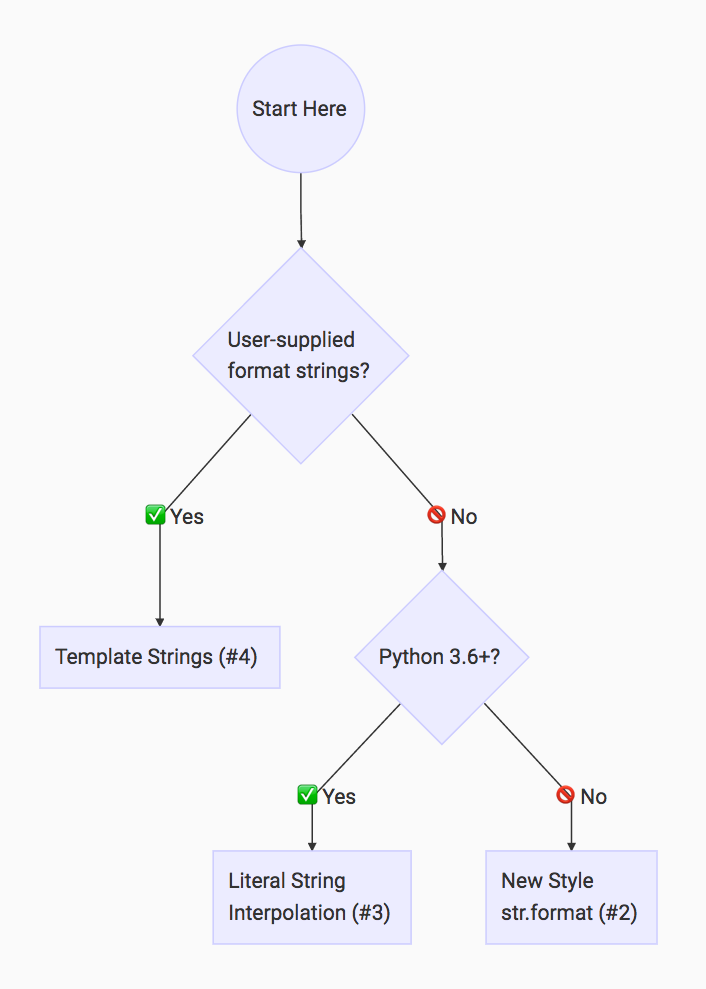
Python格式化字符串
Python目前有四种格式化字符串的方式:
- 使用
%操作符;- 使用
str.format()方法;- 模板字符串;
- Formatted String Literals(Python 3.6).
使用%
在Python3中, 不推荐使用这种方式.
使用str.format()
使用字符串的format()方法.
格式化字符串包含由{}括起来的替换字段, 不包含在{}中的内容不做处理.
可以通过{{和}}的方式来包含{和}.
- 在字符串中, 每个替换字段都用
{}括起来, 其中可能为空, 也可能包含索引, 名称, 还可能包含有关如何对>相应的值进行转换和格式设置的信息; - 在
format()方法中, 以序列或字典的形式, 列出要格式化的值.
对于替换字段, 可能有以下几种使用形式:
- 替换字段为空
根据替换字段的位置, 按顺序依次对应
format()中的各个值.
- 替换字段中使用索引
按索引对应
format()中的各项, 使用索引时, 无需按顺序排列.
- 在
format()中定义命名字段, 在替换字段中通过名称使用.
Example:
print('{} {} {}'.format('first', 'second', 'third'))
print('{3} {0} {2} {1} {3} {0}'.format('be', 'not', 'or', 'to'))
print('name is {name}, age is {age}'.format(name='sylar', age=18))

# 运行结果:
first second third
to be or not to be
name is sylar, age is 18
对于字符串, 除了str.format()方法, 还有一个类似的str.format_map()方法(Python使用字典格式化字符串).
模板字符串
使用string模块里的Template.
Example:
from string import Template

name = 'earth'
age = 4600000000

# 使用Template定义一个字符串模板
# 在其中以$key或${key}的形式定义要被替换的字段
templ = Template("$name is $age old")
# 使用Template的substitute()方法传入参数, 实例化模板
print(templ.substitute(name=name, age=age))
Formatted String Literals
f-string, 亦称格式化字符串常量(formatted string literals), 是Python 3.6新引入的一种字符串格式化方法, 主要目的是使格式化字符串的操作更加简便.
f-string在形式上是以f或F修饰引领的字符串(f'xxx'或F'xxx'), 以大括号{}标明替换的字段;
f-string在本质上并不是字符串常量, 而是一个在运行时运算求值的表达式.
注解
While other string literals always have a constant value, formatted string are really expressions evaluated at run time.
f-string在功能方面不逊于传统的%-formatting语句和str.format()函数, 同时性能上又优于两者, 且使用起来更加简洁明了,
因此对于Python 3.6及以后的版本, 推荐使用f-string进行字符串格式化.
- f-string使用花括号
{}表示替换字段, 其中的名称表示变量;
Example:
name = 'sylar'
print(f'Hello, my name is {name}')
- f-string的花括号
{}可以填入表达式或调用函数, Python会求出其结果并填入返回的字符串内;
Example:
print(f'A total number of {24 * 8 + 4}')

name = 'SYLAR'
print(f'My name is {name.lower()}')
{}种不能包含反斜杠\(用两个反斜杠\\表示对后一个反斜杠转义也不行), 但可以使用不同的引号, 用引号包裹的内容被当作字符串来处理;
Example:
name = 'Tom'
age = 3
print(f'{"name"}')

# 运行结果:
name
- 可以通过
{{}}来包含{}.
Exampl:
print(f'{{}}')

# 运行结果:
{}